Document & policy management
Keep current policies, procedures, contracts and evidence together with version history, notes and controlled access.

The CMS Compliance Portal
A configurable workspace for compliance teams, their clients and their vendor networks. Organize information, coordinate reviews and maintain a record of what happened.
Keep current policies, procedures, contracts and evidence together with version history, notes and controlled access.
Collect due diligence, manage relationships, standardize annual reviews and assess risk across providers and subcontractors.
Use configurable assessment processes, findings, reviews, heatmaps and remediation tracking.
Capture questions, issues and incidents; assign owners and route responses, supporting files and approvals.
Use manager and client review workflows, track open conditions, escalate outstanding tasks and preserve decisions.
Record required items, expiration dates and reminders, with a history of activity.
See outstanding items, status, risk and activity through configurable reports and management views.
Share records and requests across internal groups, clients, agencies and law firms with appropriate permissions.
Preserve review histories, changes, follow-up and remediation evidence in an auditable workflow.
How it works
CMS is designed around reusable records, defined tasks and documented decisions, rather than one-off emails and disconnected files. Workflows can be configured to match different review and approval requirements.
Define
Set the information required and who should review it.
Collect
Gather data and documents in a controlled location.
Review
Assign approvals, exceptions and remediation.
Report
Document decisions and surface outstanding work.
Third- and fourth-party oversight
CMS provides a network view of the organizations involved in a compliance program, including vendors and downstream providers. Review the relationships among institutions, servicers, agencies, law firms and other participants without treating each company as an isolated record.
Connected oversight records and controlled access support work across organizational boundaries while preserving appropriate visibility restrictions.
Explore vendor network oversight →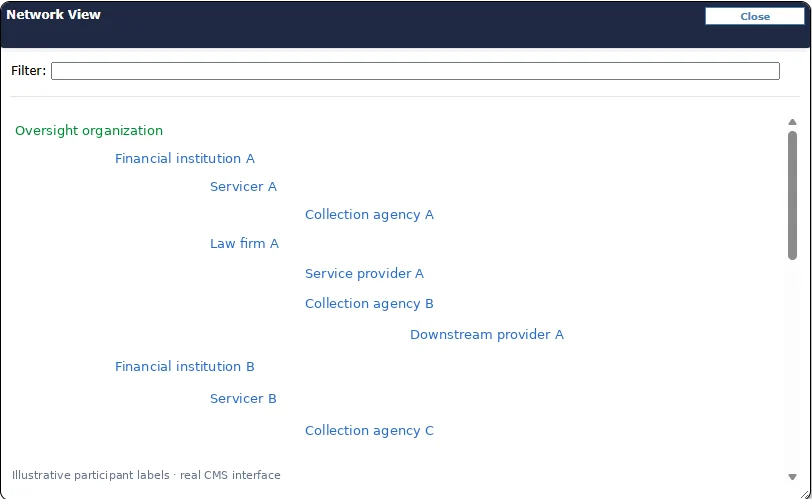
License tracking & geographic visibility
Review collection-license coverage on a color-coded map. Distinguish current licenses, pending renewals, warnings, exemptions and other tracked statuses without searching through individual records.
CMS also organizes supporting license, bond and insurance information, including expirations and follow-up.
See the license tracker in a demo →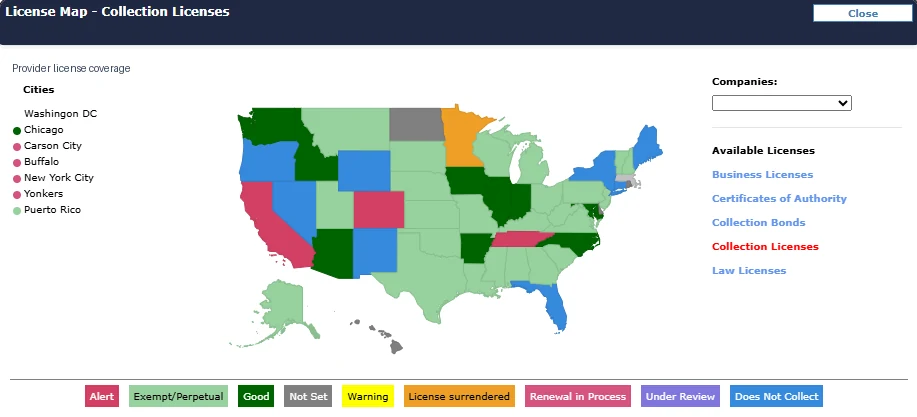
Risk assessments & heatmaps
CMS can score individual assessment items and roll results up by topic, helping reviewers distinguish higher-risk findings from areas where controls appear more effective.
Color-coded scores make exceptions easier to find and provide a practical starting point for assigning follow-up, reviewing controls and documenting remediation.
The example shown is a cybersecurity assessment report. Its scores reflect that example only, not a CMS certification, endorsement, or a statement about a particular customer.
See risk assessment capabilities →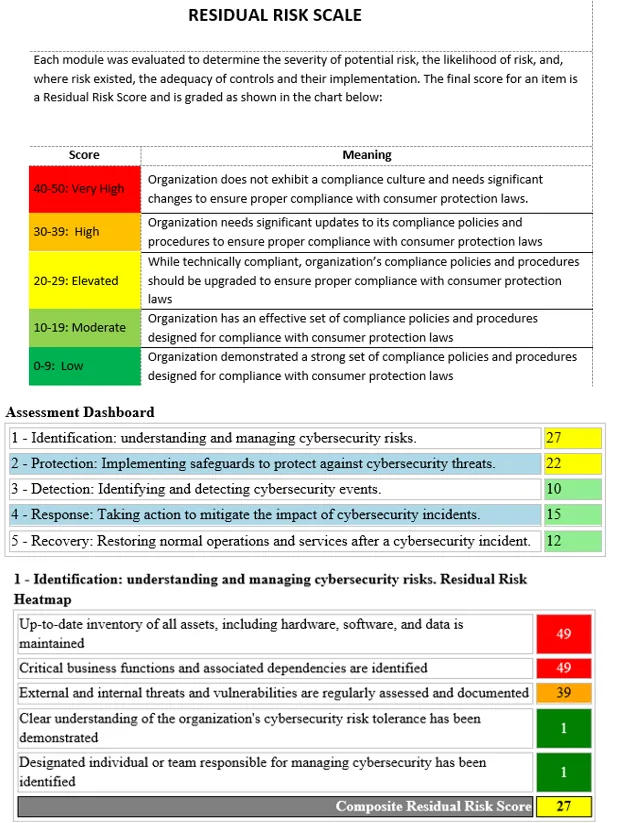
A focused demonstration can start with an existing vendor review, assessment or issue.